AnythingMCP
MCP gateway and company brain: 903 connectors (SAP, ERP, SQL), file search, memory and skills.
At a glance
Not tested yet- GitHub stars
- 807
- Last commit
- 2026-11-19
- Licence
- AGPL-3.0
- Transport
- http
- Auth
- none
claude mcp add --transport http anythingmcp https://cloud.anythingmcp.com/mcp
What it does
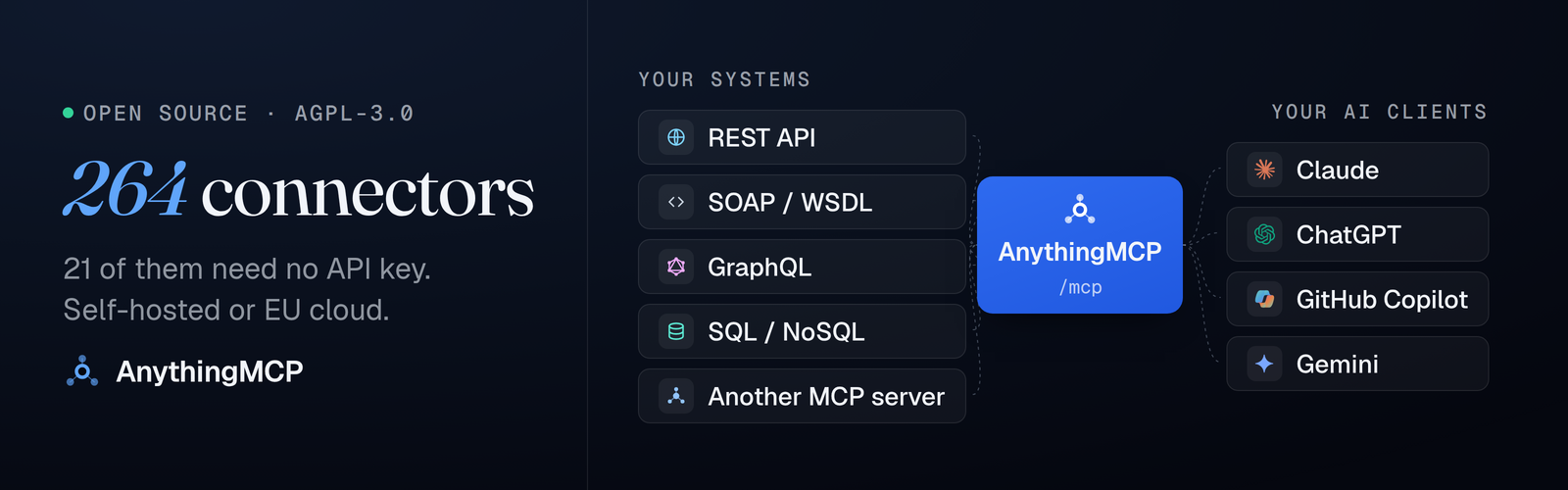
AnythingMCP is an open-source, self-hosted MCP gateway. It connects AI clients such as Claude, ChatGPT, Copilot and Gemini to the software a company runs and to documents on its file servers, without writing an MCP server. It also keeps a company brain: a knowledge graph of how systems connect, AI skills and company memory shared by every AI client and limited by each user's role. It is aimed at companies that want their existing APIs, ERP, databases and files reachable from AI clients through one MCP endpoint.
Key features
- 903 ready connectors with 12,000+ tools, among them SAP, Odoo, weclapp and Amazon Seller; 46 need no API key.
- Import your own REST/OpenAPI, SOAP/WSDL, GraphQL, OData, SQL, IMAP/SMTP or MCP source; tools register at runtime.
- File Search indexes SFTP, FTP/FTPS, WebDAV, S3 or a network share, including PDF pages, Excel rows, Word, PowerPoint and Outlook mails.
- File Share creates temporary download links, internal or public, with expiry and revoke.
- Company memory stores facts and preferences from one AI client and finds them in another, with personal and company scopes.
- AI skills hold the procedures agents follow, written by hand or learned from real requests and approved by an admin.
- Governance covers roles and per-tool permissions, response mapping that drops fields before they reach the model, and an audit log of every call.
Quick start
Requires Docker 24+ and openssl; on macOS, start Docker Desktop first.
mkdir anythingmcp && cd anythingmcp
curl -fsSLo docker-compose.yml \
  https://raw.githubusercontent.com/HelpCode-ai/anythingmcp/main/docker-compose.quickstart.yml
printf 'JWT_SECRET=%s\nENCRYPTION_KEY=%s\n' "$(openssl rand -hex 32)" "$(openssl rand -hex 32)" > .env
docker compose up -d
Open http://localhost:3000 and register: the first account becomes admin. Your MCP endpoint is http://localhost:4000/mcp.
Add it to Claude Code from a terminal:
claude mcp add --transport http anythingmcp https://cloud.anythingmcp.com/mcp
Or add this to .mcp.json in your project root (Claude Code):
{
  "mcpServers": {
    "anythingmcp": {
      "type": "http",
      "url": "https://cloud.anythingmcp.com/mcp"
    }
  }
}
For Cursor, add this to .cursor/mcp.json:
{
  "mcpServers": {
    "anythingmcp": {
      "url": "https://cloud.anythingmcp.com/mcp"
    }
  }
}
Environment variables
JWT_SECRET: generated into.envby the quickstart command.ENCRYPTION_KEY: decrypts the credentials you store. Lose it and every connector has to be re-credentialed.
Example prompts
- Look up a customer in SAP and list their open orders.
- Find the PDF invoices from last quarter on the file server and tell me the file, page and date for each.
- Export this month's orders from the database as a CSV and give me a download link.
- Remember that our fiscal year starts in April, so I do not have to repeat it.
What to watch out for
- The quickstart binds to
127.0.0.1on purpose, because nothing in front of it terminates TLS. For an instance other people or a cloud AI client can reach, clone the repo and run./setup.sh. - Keep the generated
.env. LosingENCRYPTION_KEYmeans every connector has to be re-credentialed. - The image is amd64 only for now; the compose file pins the platform, so it also runs on Apple Silicon under emulation.
- The self-hosted Community edition is free under AGPL-3.0 for up to 3 active users. More users, single sign-on, SCIM, File Search beyond the 30-day trial and support come with Enterprise, on request.
- File Search and File Share are available on Cloud and self-hosted Enterprise; company memory is Enterprise; SSO and SCIM are Enterprise.
Not tested by tools4agents yet. Read the source repository before you install it.
The registry entry does not say how this server authenticates. Check the source repository before you rely on the auth field.

Similar tools
Memory
A knowledge graph that persists facts across sessions, so an agent can recall context after the conversation ends.
DBHub
Token-efficient MCP server for PostgreSQL, MySQL, MariaDB, SQL Server, Oracle, ClickHouse, SQLite
PostgreSQL
Read only SQL access with schema introspection, so an agent can answer questions about your data without guessing column names.
Supabase MCP Server
Connects AI assistants directly to Supabase projects to manage database tables, query data, run migrations, and control edge functions.