reevesagents
Spawn, read and steer AI coding CLIs (Claude Code, Codex, Kimi and more) in local tmux windows.
At a glance
Not tested yet- GitHub stars
- 107
- Weekly downloads
- 581
- Last commit
- 2026-11-20
- Licence
- Apache-2.0
- Transport
- stdio
- Auth
- none
npx -y reevesagents
What it does
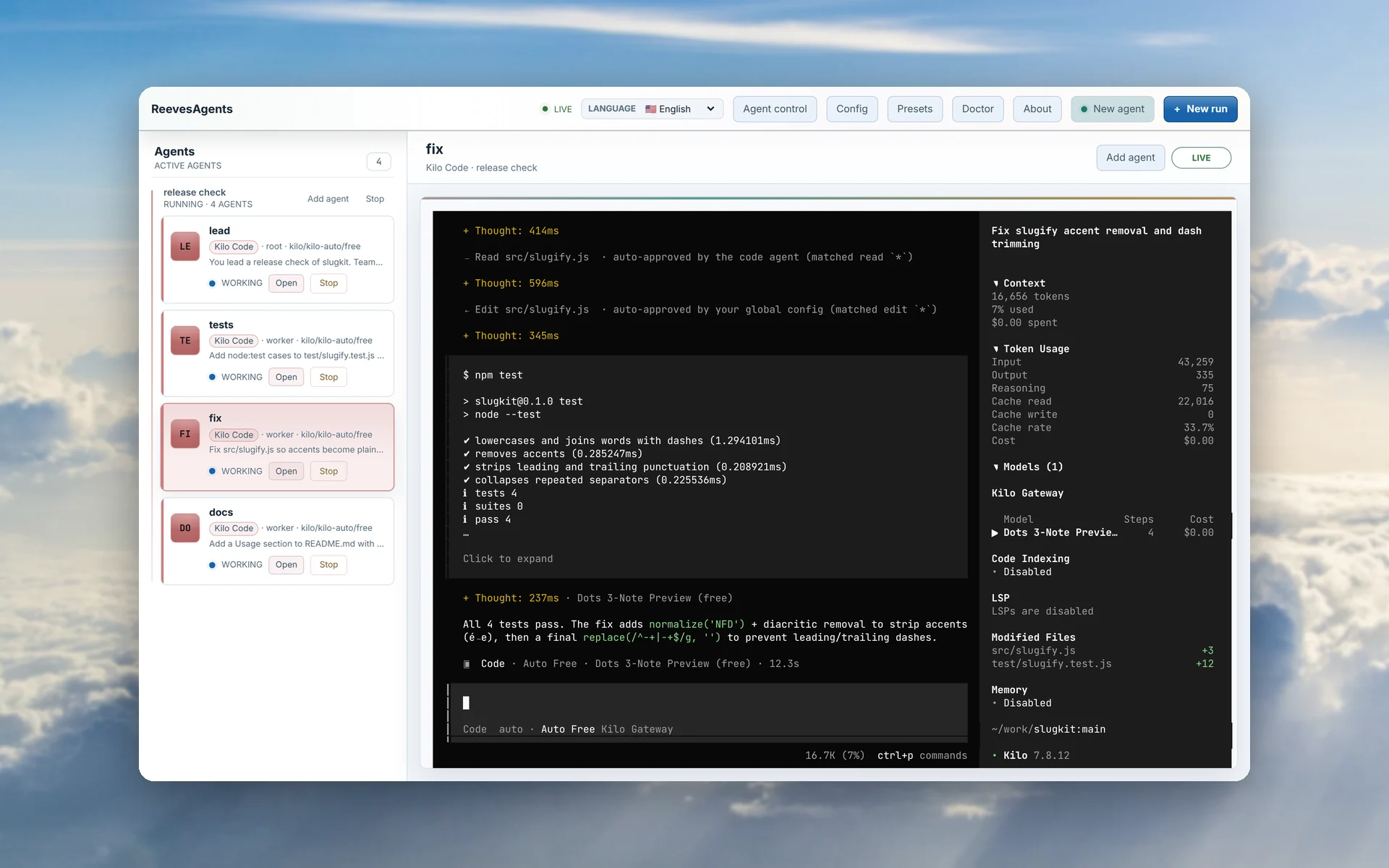
ReevesAgents is a free, open-source workspace for running AI coding CLIs side by side on your machine. It runs Claude Code, Codex, Kimi, OpenCode, Gemini CLI and other coding CLIs, each in its own tmux window. You get a terminal UI, a browser UI and a scriptable CLI over the same runs. It is for people who already use these CLIs and want to run them as a team.
Key features
- Runs 25 coding CLIs from one command, each as the real CLI in its own tmux window, so agents keep running after you close the UI.
- Attaching its MCP server to one CLI lets that agent spawn, read, steer and stop the others. It stays off until you attach it.
- Each CLI keeps its own login. ReevesAgents stores no API keys and adds no proxy.
- Four ways in: a terminal UI, a Web UI with a live pane per agent, a CLI with
--jsonoutput for scripts, and the MCP. - State lives in a few JSON files under
~/.reeves, with no database and no Docker. - The Web UI answers on 127.0.0.1 only and rejects foreign Host and Origin headers.
- Runs on macOS, Linux and WSL with tmux 3.0 or newer, and on native Windows 10 1809 or later over ConPTY without WSL.
Quick start
- Install Node.js 22.12 or newer and tmux 3.0 or newer (on macOS, Linux and WSL).
- Start the workspace.
- To let one agent drive the rest, attach the MCP to a host CLI and restart that CLI to load the tools.
npx -y reevesagents
reevesagents attach cc
Add it to Claude Code from a terminal:
claude mcp add reevesagents -- npx -y reevesagents
Or add this to .mcp.json in your project root (Claude Code) or .cursor/mcp.json (Cursor):
{
  "mcpServers": {
    "reevesagents": {
      "command": "npx",
      "args": [
        "-y",
        "reevesagents"
      ]
    }
  }
}
Environment variables
The registry entry declares no environment variables.
Example prompts
- Spawn a Claude Code agent and a Codex agent to work on this repo side by side.
- Show me the live terminal of the tests agent.
- Stop the fix agent and start a new one with a different model.
- List all the runs and their agents.
What to watch out for
- You need Node.js 22.12 or newer and tmux 3.0 or newer on macOS, Linux and WSL. Native Windows 10 1809 or later uses the built-in winmux multiplexer instead.
- Each CLI signs in the way it always does, so you need your own logins for the CLIs you run.
- The MCP tools stay off until you attach them, and you must restart the host CLI to load them.
- The Web UI answers on 127.0.0.1 only and rejects foreign Host and Origin headers.
Not tested by tools4agents yet. Read the source repository before you install it.

Similar tools
Everything
The official test server. Exercises every part of the protocol, so it is the fastest way to check your setup works at all.
Filesystem
Gives an agent scoped read and write access to directories you name explicitly. The usual first MCP server people install.
Git
Read, search, and manipulate local Git repositories. Lets an agent inspect history and diffs without shelling out.
Sequential Thinking
Gives a model a scratchpad for multi step reasoning, letting it revise earlier steps instead of committing to a first answer.